
Over the last many decades, perhaps one of the biggest achievements for Apple has involved how the world interacts with people with disabilities. The Cupertino-based company has long been drawn to innovations that embed accessibility into everyday technologies. December 3 marks another International Day of Persons with Disabilities, while several features found on the iPhone, iMac, Apple Watch, MacBook or AirPods reflect a strategy built on the belief that innovations designed primarily for people with disabilities have also benefited the broader public.
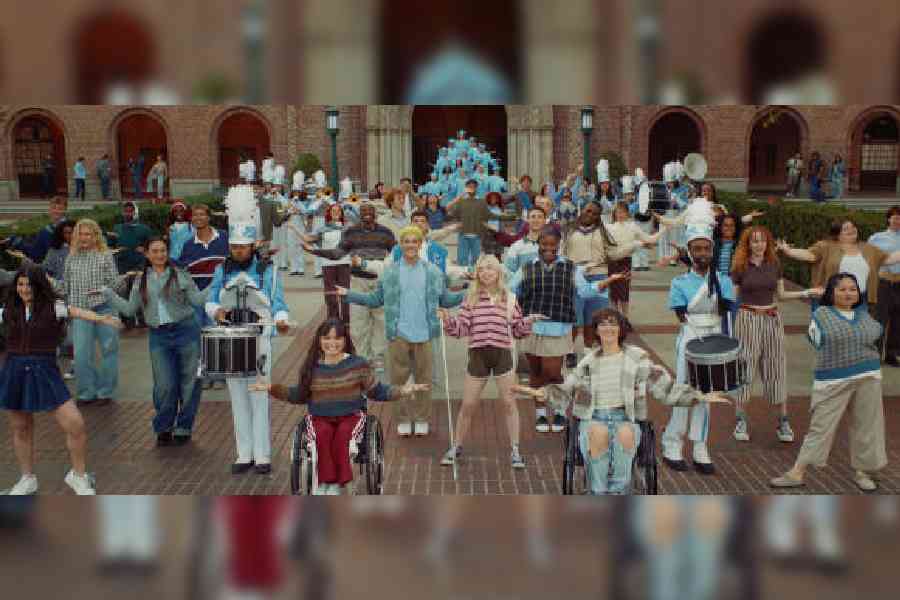
The year 2025 marks 40 years of accessibility at Apple. It’s impossible to put a number to the bouquet of accessibility features available on Apple devices because that would be a miles-long list. Instead, Apple has put out a new film — one that’s definitely going to make you move — that reminds us that the world can be beautiful for all of us, together. The film shows how students with disabilities use Apple products and accessibility features in daily life to get the full college experience.
After all, education is always more than just academics. For students with disabilities, enjoying life outside the classroom is a vital part of learning, independence, and belonging, and to make it happen, there needs to be access to the right tools for getting around campus, learning a skill, spending time with friends and everything in between.
The film is directed by Kim Gehrig, who returns after directing Apple’s Emmy Award-winning accessibility short The Greatest in 2022. It is accompanied by a memorable musical number featuring performances from a range of deaf and disabled students from around the world, with songwriting and musical production from Tony Award-winning composer Tim Minchin.
Innovations to the rescue
Forming the heart of the film are some of the most important accessibility features available across the Apple ecosystem. Most of the features are available globally because the problems are the same wherever you go.
VoiceOver is a much-needed feature. For those who are blind or have low vision, it is a screen reader that tells you exactly what’s happening on your screen audibly, in Braille or both. Easily control and navigate your screen through simple gestures on a touchscreen, trackpad or Bluetooth keyboard. VoiceOver can describe your surroundings in great detail. Combined with Live Recognition, users receive descriptions of objects in the real world, such as people, doors, text and furniture in indoor spaces.
Magnifier uses the camera on your iPhone or iPad to increase the size of any physical object you point it at, like a menu or a sign. On Mac, it connects to an attached camera so you can zoom in on your surroundings, such as a screen or whiteboard. The feature works with Continuity Camera on iPhone as well as attached USB cameras. It also supports reading documents using Desk View.
Shown in the film is the power of Braille Access, an experience that turns iPhone, iPad and Mac into a full-featured Braille note-taker that’s integrated into the Apple ecosystem. With a built-in app launcher, you can easily open any app by typing with a connected Braille device. Quickly take notes in Braille format and perform calculations using Nemeth or UEB Maths, two Braille codes often used in classrooms for maths and science.
Allowing the touchscreen to adapt to your physical needs is AssistiveTouch for iOS and iPadOS. If certain gestures, like pinch or two-finger tap, don’t work for you, swap them with a gesture that does or create a touch that’s all your own. You can also use AssistiveTouch to replace pressing buttons. You can customise the layout of the AssistiveTouch menu or connect a Bluetooth device to control an onscreen pointer for navigation.
On the Apple Watch, AssistiveTouch helps those with upper-body limb differences use hand gestures such as clench, double-clench, tap and double-tap to control apps and experiences across Apple Watch.
Helping college students with special needs is Accessibility Reader, a system-wide reading experience designed to make text easier to read for people with a wide range of disabilities, from dyslexia to low vision. Accessibility Reader gives you new ways to customise long-form text and focus on content you want to read, with extensive options for font, colour and spacing, as well as support for Spoken Content. It can be accessed from any app and is built into the Magnifier app for iOS, iPadOS and macOS.
Sound & Name Recognition is such an important part of life when users with special challenges are alone at home. It listens for certain sounds and uses on-device intelligence to notify you when they are detected. This feature recognises 15 different sounds (you can also train your device to listen for your name, as well as electronic sounds that are unique to your environment, like the beeping of appliances in your kitchen, specific types of alarms or doorbells).
On HomePod, Sound Recognition can even detect the sound of a smoke or carbon monoxide alarm. It even supports CarPlay, too. The iPhone can listen for and detect sirens and horns and even the sound of a crying baby.
In the classroom, Live Captions can be a game-changer. It offers real-time, on-device-generated transcriptions of conversations so you can follow along securely on your device. You can turn on Live Captions in your phone calls, FaceTime calls or any web content you’re browsing. They can even capture and caption live, in-person speech through the microphone in your device.
Accessibility is part of Apple DNA
Apple has been working on accessibility features when few, if any, mainstream tech companies were talking about them. The launch of the original Macintosh took place on January 24, 1984, two days after the famed “1984” commercial during Super Bowl XVIII.
A couple of years earlier, developer Mark Barton had come up with a text-to-speech synthesis programme called Software Automatic Mouth or S.A.M. Like life, one thing led to another. Barton and his friend Joseph Katz worked on a project that became the foundation of MacinTalk. Originally, it was supposed to be included in the system folder and bundled with every Mac as part of the basic OS. The launch of the Macintosh was near but the demo’s memory footprint was not optimised. The issue was fixed in the lab.
Steve Jobs announced on stage: “For the first time ever, I’d like to let Macintosh speak for itself.” It did: “Hello, I’m Macintosh. It sure is great to get out of that bag. Unaccustomed as I am to public speaking, I’d like to share with you a maxim I thought of the first time I met an IBM mainframe: ‘Never trust a computer you can’t lift!’ Obviously, I can talk but right now I’d like to sit back and listen. So, it’s with considerable pride that I introduce a man who’s been like a father to me… Steve Jobs.”
In a year’s time, MacinTalk paved the way for something bigger. Apple opened its first office of disability in 1985, five years before before the Americans with Disabilities Act came into place.
With every innovation, parents realised their special children had options and adults discovered tools that supported independence while at work; co-workers across the board could collaborate.
For example, in 2005, Apple introduced VoiceOver, a screen reader that is built into the Macintosh operating system. Years later, it gave blind users full control of the iPhone’s touchscreen, something nobody once thought was possible.
For Apple, accessibility has always come right out of the box. Even after 40 years, it continues to be so.