Imagine sitting at an airport, waiting for take-off. Or you are in a cafe, making an important payment. The task involves tapping in your security PIN. You might be scrolling through emails meant only for your eyes.
How private are these moments? In truth, not very. There are curious eyes everywhere.
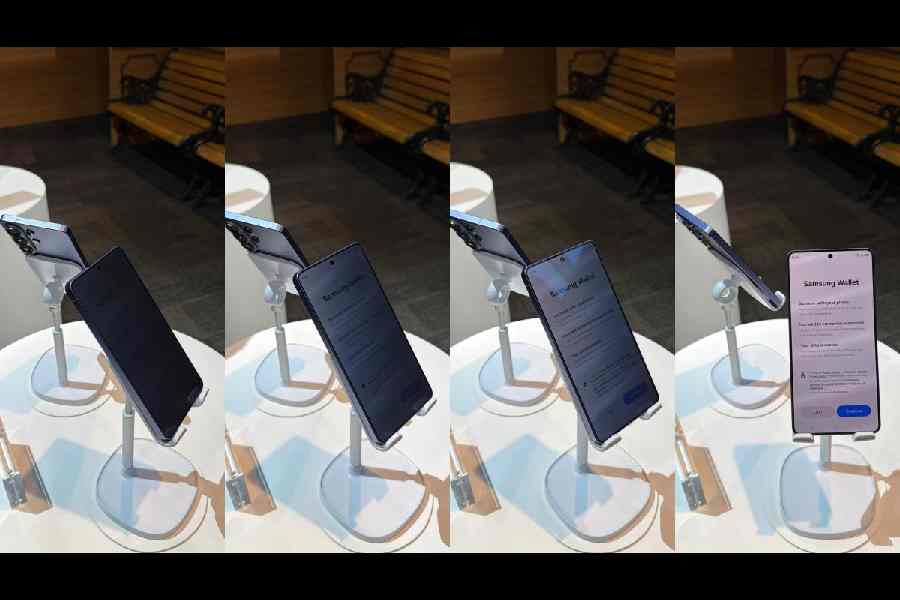
To tackle shoulder surfing, Samsung has introduced what it describes as the mobile industry’s first built-in Privacy Display with the Galaxy S26 Ultra. The phrase “game changer” is often overused. But this is not about a special screen protector or a stick-on privacy film. Samsung’s technology works at pixel level inside the display itself.
The system goes beyond typical hardware or software tricks. By controlling how pixels disperse light, the display keeps content clear and sharp when viewed head on, while limiting what others can see from side angles. In crowded public settings, that difference matters.
You can customise when the feature switches on, such as while entering PINs and passwords or when opening selected apps. You can also adjust the level of privacy depending on the situation. For moments that require extra discretion, Maximum Privacy Protection further reduces what can be seen from the side.
Think about a familiar scenario. At a pub, people are relaxed. You are paying the bill. The passcode involves six digits. If someone shoulder surfs and catches even five of them, guessing the last digit is not difficult. The thief, often working with others, waits for you to look away, grabs the phone and leaves quickly. They unlock it, move money or access accounts. They may even enter the wrong password repeatedly, locking or disabling the device.
So far, many people have tried to protect themselves with privacy screen protectors. These are particularly popular among those in sensitive professions, such as doctors and therapists, who must protect patient information when working outside their offices.
But stick-on films have clear downsides. They can make texting harder and images less sharp. Viewing angles become awkward even for the owner. Photos can lose clarity. Because these protectors add thickness, fingerprint recognition may not work as smoothly. When paired with an ultrasonic fingerprint sensor that relies on 3D depth mapping, users often need to press harder or try more than once.
In a world where we assume some level of surveillance in public spaces, phone screens have become obvious targets. Samsung’s approach is different. Instead of placing another layer on top of the screen, it builds privacy into the display itself.
The feature must be turned on and adjusted to your preferred setting. When you look directly at the screen, full viewing quality is preserved. But from side angles, visibility is reduced. It does not matter whether the phone is in portrait or landscape mode. Because it works at pixel level, the protection functions either way.
Partial Screen Privacy intelligently limits visibility for things like notification pop-ups. Maximum Privacy Protection goes further, obscuring side views more strongly when required. The aim is to balance discretion with everyday usability, without noticeable impact on battery life or performance.
For anyone who checks bank accounts in public or keeps personal photos on a phone, the idea of an integrated privacy shield makes practical sense.
There is another factor. Smartphone displays have evolved rapidly. Most companies now offer brighter screens than they did just two years ago. We often increase brightness to make content easier to read outdoors. But higher brightness also makes screens more visible to people nearby. Without privacy controls, that extra clarity works both ways.
Some might argue that in 2026 we share family photos online constantly, so worrying about on-screen privacy seems pointless. But what we choose to post is deliberate. It represents a version of ourselves we are comfortable making public. Not every email, bank balance or personal image is meant for strangers sitting next to us. Using Privacy Display is a way for users to control their physical surroundings in real time.
Security beyond the display
Privacy Display is one part of a broader focus on security in the Galaxy S26 series.
AI-powered Call Screening can identify unknown callers and summarise their intent, making it easier to decide whether to answer. In an age of scam calls and spoofed numbers, that extra layer of clarity can reduce risk.
Privacy Alerts use machine learning to notify users in real time when apps with device admin privileges attempt to access sensitive data such as precise location, call logs or contacts. These alerts are designed to make it clearer when an app is seeking deeper access, allowing users to manage permissions with confidence.
Another feature is Private Album, built directly into Gallery. It allows users to hide selected photos and videos easily, without creating a separate folder or signing into a Samsung Account. The idea is simplicity. Sensitive content can be tucked away quickly.
The Galaxy S26 series also extends Samsung’s work in post-quantum cryptography to core system processes, including software verification and firmware protection. The goal is to strengthen device integrity against future threats as computing power increases.
Updates to Knox Matrix add post-quantum encrypted transfers for tasks such as eSIM migration. Users can also see firmware update status across connected Galaxy devices through a clearer Security Status view.
These features are supported by Samsung Knox, the company’s multi-layer security platform. For on-device Galaxy AI, the Personal Data Engine processes contextual information securely. KEEP encrypts each app’s data, while Knox Vault adds a physical layer of protection by isolating sensitive information in dedicated secure hardware.
These updates sit alongside existing tools such as Auto Blocker, Theft Protection, Private Sharing and Secure Wi-Fi.
The larger point is straightforward. As smartphones become brighter, smarter and more capable, the risks around them also grow. A privacy feature built directly into the display may seem simple, but in everyday situations it addresses a problem most users recognise immediately.
The writer is in San Francisco on an invitation from Samsung