
It has only been a few days since the iOS 27 developer beta became available, and we have been testing it on the iPhone 17 Pro Max. Beyond the major Siri AI-related upgrades, there are several new features and refinements expected to make their way into the public release of iOS 27 later this year. In the meantime, here are some of the features and updates we have been enjoying in the developer beta.
Timer graphic
Once you select the timer option in the Control Centre, a neat-looking graphic pops out of the Dynamic Island, and you get a small scroll bar to choose the duration. It comes with satisfying haptic feedback.
A fundamental shift
For years, you could pull down from the top middle of the screen to access the Notification Centre. However, that is no longer the case with iOS 27. Pulling down from the middle now opens the new Siri experience — or, in other words, ‘Search or Ask’, which also incorporates Spotlight Search.
To access notifications, you now need to pull down from the top left, rather than the Dynamic Island. Speaking of notifications, there is also an update to how they appear. Notifications now animate in from the left, and when they disappear, they slide back towards the left before moving upwards.
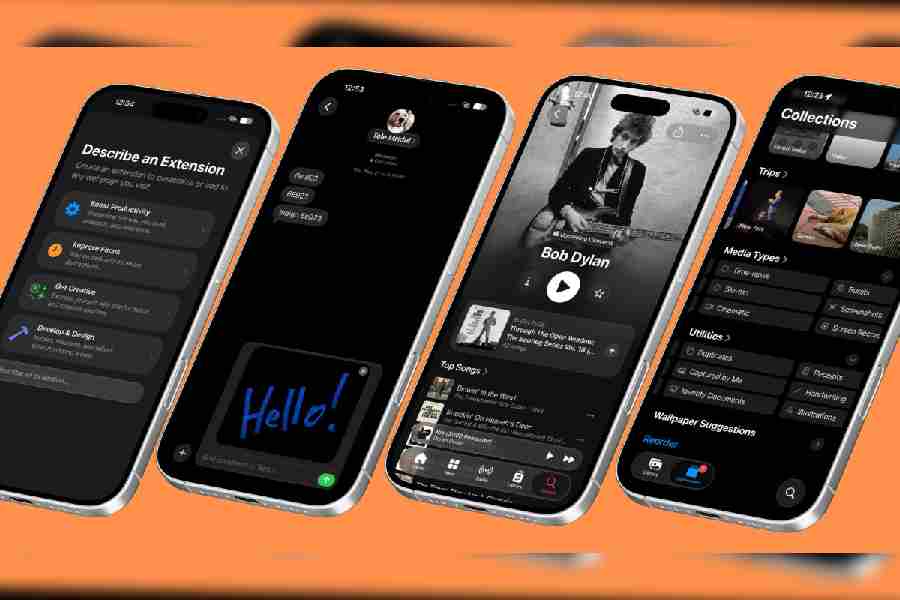
Also coming with iOS 27 (l-r): Create Extensions in Safari, drawing inside Message app, updates to Apple Music interface, and Captured by Me option in Photos app
Siri AI
The new Siri AI brings one of the biggest changes to iOS yet. Pressing the side button now triggers a new Siri indicator. Previously, Siri featured an animation around the edges of the screen, but that is no longer the case. The experience is much more streamlined, with Siri emerging from the Dynamic Island.
Another important update is the granular control over Siri’s voice. In Settings, go to Siri and then select the Voice option. You can now adjust pace and expressiveness. There is also a feature called Expressive Voices Preview, which offers an early preview of more natural, expressive voices powered by a new on-device model. In simple terms, Siri will sound far less robotic.
On-screen awareness
With iOS 27, Siri gains personal context capabilities, which is where things get particularly interesting. Try asking something like: ‘When did my wife say she was leaving in the evening?’ Siri will search through Messages and emails to find a relevant reference. If there has been a conversation around the topic, the timing will appear. It can also scan your Calendar for appointments, and you can ask follow-up questions for more context.
That is not all. If you are watching a video and find someone on screen familiar, you can invoke Siri AI to identify the person. It can also recognise places shown on screen, making it easier to save destinations to your travel list.
Standalone Siri app
There is now a dedicated Siri AI app. What does it do? If you use multiple Apple devices, it allows you to view conversations across devices and seamlessly continue them. Similar to ChatGPT or Claude, Siri now supports back-and-forth conversations that you can revisit later.
There is also an option to add files, photos, or live images to provide Siri with additional context. Conversations can be retained for 30 days, one year, or indefinitely.
Siri in the Camera app
The Camera app now includes a new Siri tab. Simply point the camera at an object and press the Siri AI button to begin searching for information automatically. This is Apple’s visual intelligence feature.
If an object is far away, you can zoom in using the pinch gesture. In practice, this means you could point your camera at a packet of junk food and instantly view its nutritional information.
Image Playground updates
The Image Playground app icon has received a complete redesign compared to iOS 26. You can now describe an image you want the app to create, and within each style, choose exactly what you want to generate — whether that is an animation, illustration, sketch, or Genmoji.
You can also reference photos and people, as well as choose image dimensions, making it easier to create wallpapers using only a text description.
Writing tools
Writing tools have improved significantly in iOS 27. Previously, there was a full menu for proofreading and rewriting text, which often felt somewhat redundant. The writing tools interface has now been completely redesigned around Siri AI.
The experience is far less confusing, and you can simply ask Siri for help. After writing something, tap on the text to bring up the Siri icon, then instruct Siri on what you want to do next. For example, if you have made a few notes during a meeting, Siri can turn them into a polished document. You can also ask Siri to write a story or expand on your ideas.
Liquid Glass slider
Previously, some users wanted the older opaque look to return to iOS. Apple now provides greater flexibility. In Settings, visit the Appearance section, where you will find a slider to adjust the intensity of Liquid Glass across the operating system.
Don’t change time zone
The Date & Time section has received an important update. Previously, there was a single option labelled ‘Set Automatically’. Now, there are separate controls for ‘Set Time Zone Automatically’ and ‘Set Time Automatically’.
This means you can stop your time zone from changing automatically while travelling, ensuring your preferred time remains unchanged even when visiting other cities or countries.
Camera app
This update may particularly interest iPhone users, as the camera remains one of Apple’s biggest strengths. One of the most obvious changes appears immediately upon opening the Camera app. At the top, there is a redesigned interface featuring formats and Shared Library controls front and centre.
Previously, these options were placed on the left-hand side, alongside a small six-dot menu in the upper-left corner. That menu has now moved to the bottom right.
Another major difference appears when you tap the six-dot menu. Earlier versions offered only six options, but iOS 27 includes many more. This is useful because it means you no longer need to enter Settings to change options such as Grid or Level. Previously, these could only be enabled or disabled through Settings; now, you can adjust them directly within the Camera app.
Additionally, tapping the format option at the top now opens a dialogue box at the bottom of the screen. This aligns more closely with the Camera app’s design and makes controls easier to access.
iOS 27 will also introduce smoother camera switching while zooming in during video recording. If zoom transitions previously felt abrupt, the experience should now feel noticeably smoother.
Photos app
A particularly useful addition is a new option called Captured by Me. This view displays only the photos and videos you have personally taken, excluding screenshots and media received from apps such as WhatsApp.
There is also an Identity Documents section, which stores items such as passports, Aadhaar cards, and other important identification documents.
When you swipe up on a photo, several new options appear. You can add the photo’s capture date to your calendar, use Ask Siri, or perform an image search to cross-reference the picture. The metadata section has also been redesigned to look cleaner, and you can now add keywords to photos for easier searching.
Messages
Draft messages are now easier to track. If you begin typing a message but do not send it, the draft will appear in your main Messages view, labelled as a draft alongside a preview of what you were typing.
Genmoji within Messages has also been refreshed. The interface now resembles Image Playground, and you can tap suggested emojis for inspiration.
There is also a brand-new feature called Drawing, which allows you to sketch a message to someone directly within the app.
Create custom extension
Safari introduces a new feature called Describe Extensions, available through the address bar. It allows users to create Safari extensions using natural language.
For example, you could ask it to build something simple such as: ‘Show me the names of the fonts used on a website.’ Siri will then surface relevant App Store results. If a suitable extension does not already exist, you can create one yourself.