Before Google’s biggest event of the year — I/O 2026 — even begins on May 19, the company is already showing its hand. Google held its Android Show on Tuesday and it centred on Android 17 and a fresh round of updates to the Gemini assistant, with a clear throughline connecting them: Google wants its mobile operating system to feel less like software you navigate and more like a system that anticipates what you need. At the same time, the user always has control over the system. Here are some of the top features arriving with Android 17.
All things Gemini Intelligence
Android 17 will work more as an “intelligence system.” Google is embracing the era of agentic AI, injecting Android 17 with features designed to handle tasks on your behalf. Many of these features are not necessarily tied to Android 17 itself, and will roll out in waves starting with Samsung Galaxy and Google Pixel phones this summer, as well as smartwatches, cars, smart glasses, and laptops later in the year. When you interact with the AI chatbot, there will be visual cues indicating when it is thinking, listening, or working on your behalf.
A few months ago, Gemini Task Actions arrived, allowing users to ask Gemini to book an Uber or order their favourites from DoorDash. Once a task gets underway, Gemini opens a virtual app experience and works through the steps while you continue using your phone for other things. Support for more apps and services is on the way, and it may not even be necessary to have a specific app installed, as Gemini can handle certain tasks via the Chrome browser.
Chrome Auto Browse is coming to Android very soon. Starting in late June, users will be able to use Gemini as a browsing assistant in Chrome, asking it to plan a party, book appointments, or locate difficult-to-find items on their behalf.
Intelligent Auto-fill is expected to overhaul the autofill function in Chrome. With Gemini’s help, complex information — such as passport numbers or licence plate details — can be filled across Android apps and Google Chrome with a single tap. The intelligence works behind the scenes, so users should not notice any change in how they interact with forms. If you need to enter your passport ID, for instance, Gemini can source that information from your emails or a photo of your passport saved in Drive.

AI-generated widgets
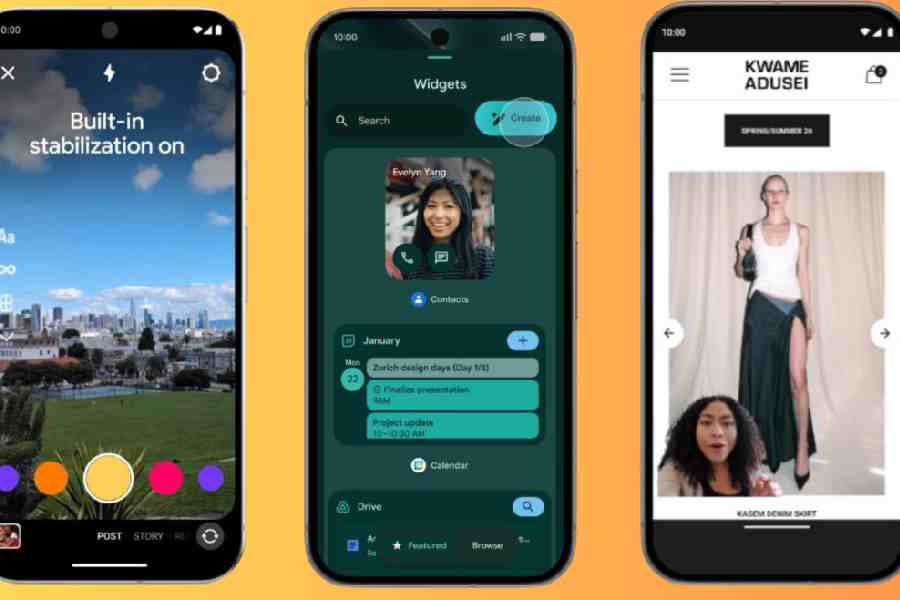
Widgets are not new to Android, but they are getting an AI upgrade. Create My Widget allows users to build custom home screen widgets using natural language. These widgets are not tied to any specific app. Ask Gemini to suggest three high-protein meal-prep recipes each week, for example, and the recommendations will refresh automatically in a dedicated widget. This feature is coming to select Galaxy and Pixel phones this summer.
Screen Reactions
The feature is aimed at content creators. In just a few taps, you can record yourself and your screen simultaneously, overlaying your response directly onto trending clips, comment sections, or a gift guide. There is no need to export or transfer video and audio separately. You can record any on-screen content — photos, videos, webpages, and more — and you will appear as a cutout in front of it.
Google has also announced a partnership with Meta to improve the quality of content uploaded from Android devices. Ultra HDR capture and playback will offer lifelike vibrancy with colours that pop. Built-in video stabilisation will smooth out footage when you are walking, dancing, or simply highly caffeinated. Night Sight integration will attempt to deliver a clean shot even in the dimmest conditions.
Google has confirmed that Instagram is now fully optimised for Android 17 tablets. Adobe Premiere is also coming to Android this summer, with APV support on select Snapdragon 8 Elite-powered devices. The app will include exclusive templates and effects for creating and posting YouTube Shorts directly from within it.
For professional filmmakers, APV (Advanced Professional Video) is described as the industry’s most storage-efficient professional video format, built for the modern mobile creator. Co-developed with Samsung, it is available now on the Samsung Galaxy S26 Ultra and vivo X300 Ultra.
3D emoji
Google is overhauling Android’s full set of emoji — all 4,000 of them. The new collection, delivered via Noto 3D, gives each emoji added weight and dimension, which Google believes will allow emotions to be expressed more authentically. The new set will roll out across Google services, beginning with Pixel phones later this year.
Pause Point
Pause Point is a new Digital Wellbeing feature designed to curb doomscrolling. Once you mark an app as distracting, Pause Point will appear whenever you attempt to open it. It will not block access entirely, but it will ask you to wait through a ten-second timer, with prompts to try a breathing exercise or switch to a more productive app instead. You can also set how long the wait period lasts each session, adding a layer of intentional friction to habitual scrolling.
Device switching
Switching to Android is becoming easier. Home screen shortcuts will now be carried over during the transfer process, so you will not have to rebuild your set-up from scratch. Saved passwords will also transfer across.
Rambler
Rambler is a Gemini Intelligence feature rolling out to the latest Samsung Galaxy and Google Pixel phones this summer. It improves voice dictation on Google’s Gboard keyboard, using AI to identify and remove filler words such as “um”, “ah”, and “like” from transcriptions. If someone interrupts you mid-dictation and you respond to them, Gemini will strip that portion from the transcript as well. The result is a clean, natural-sounding version of what you intended to say. Rambler works across multiple languages, and Google states that audio is neither stored nor saved.
Using Gemini’s advanced multi-lingual model, Rambler can switch between languages in a single message. Whether you’re blending English with Hindi or any other combination, Rambler understands the context and the nuance, ensuring your message sounds exactly like you... only more polished.
More security features
Android 17 also brings a range of privacy and security improvements, several of them aimed at protecting users from financial scams. Google notes that scammers are increasingly impersonating banks and financial institutions through spoofed calls — manipulating caller ID systems to make fraudulent calls appear legitimate. According to Google, such schemes contribute to an estimated $980 million in annual losses worldwide.
To address this, Google is working with select banks and financial institutions on verified financial calls, a feature that automatically ends calls from spoofed numbers impersonating participating financial apps. If you have a participating institution’s app installed and are signed in, Android works in the background to verify incoming calls.
Additional protections include improved malware detection that scans app behaviour for suspicious activity such as SMS forwarding or apps launching in the background. Chrome’s safe browsing mode will also scan APK downloads for known malware. For stolen devices, users will be able to enable biometric protection remotely when marking a phone as lost in Find Hub, and Google is reducing the number of PIN or password attempts allowed while extending the wait time between failed guesses.
Android Auto
There are quite a few updates to Android Auto and cars with Google built-in. With more than 250 million Android Auto-compatible cars on the road today, the updates are important. Android Auto is bringing the Material 3 Expressive design from your phone to your car with expressive fonts, smooth animations and wallpapers.
There is also help in the form of Gemini. Gemini is now widely available in Android Auto to help you get more done. And if your phone has Gemini Intelligence, you’ll be able to access it in Android Auto later this year. With Gemini Intelligence, your device understands your context, anticipates your needs and gets things done on your behalf. That means if you get a text from a friend asking for an address, Magic Cue will understand the context of the question, find the answer using information from your text messages, email or calendar, and offer to send a reply with the right information, all in a single tap.
Apps like Gemini and Maps are even better in cars with Google built-in. Gemini, which is currently rolling out to cars with Google built-in, will answer questions that are specific to your actual car — like identifying a mysterious indicator light on the dashboard or letting you know if the TV you’re about to pick up will fit in your trunk.
Mathures Paul