Summary
The Ministry of Electronics and Information Technology (MeitY), in collaboration with DigiLocker, has issued a public cyber safety advisory warning students and parents against a fraudulent website.
In an official alert shared on the social media platform X, authorities warned users not to interact with the website.
The Ministry of Electronics and Information Technology (MeitY), in collaboration with DigiLocker, has issued a public cyber safety advisory warning students and parents against a fraudulent website allegedly impersonating DigiLocker and the Council for the Indian School Certificate Examinations (CISCE).
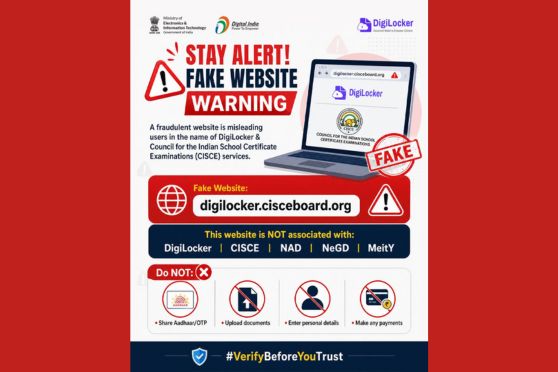
In an official alert shared on the social media platform X, authorities warned users not to interact with the website “digilocker.cisceboard.org”, stating that the portal is fake and has no association with DigiLocker, CISCE, the National Academic Depository (NAD), the National e-Governance Division (NeGD), or MeitY.
DigiLocker X handle
According to the advisory, the fraudulent portal is misleading users by falsely presenting itself as an official platform offering DigiLocker and CISCE-related services. The warning comes at a time when thousands of Class 10 and Class 12 students across the country are accessing digital marksheets, certificates, and academic records online following board examination results.
Officials cautioned that the fake website may attempt to collect sensitive personal information from users under the pretext of providing educational document services. Authorities specifically advised students and parents not to share Aadhaar details, OTPs, uploaded documents, banking information, or any personal credentials on suspicious websites.
The cyber safety warning prominently advised users: “Do NOT share Aadhaar/OTP”, “Do NOT upload documents”, “Do NOT enter personal details”, and “Do NOT make any payments” on unverified portals.
DigiLocker also urged users to carefully verify website URLs before accessing any digital education or document-related service online. The advisory carried the message “Always verify the URL before using any digital service” along with the hashtag “#VerifyBeforeYouTrust”.
Authorities highlighted that students and parents should rely only on official DigiLocker platforms and verified education board websites while downloading marksheets and certificates.
To access official digital marksheets through DigiLocker, students are required to visit the official DigiLocker portal (digilocker.gov.in) and sign in using their registered mobile number and OTP. After logging in, users can access the “Issued Documents” or “Search Documents” section and select CISCE from the list of education boards.
Students then need to enter details such as their year of passing and UID or index number. Once verified, their ICSE or ISC digital marksheet and certificate become available for download and storage within the DigiLocker account.
The advisory has been issued amid increasing concerns over cyber fraud targeting students during examination and result periods. With digital academic records becoming widely accessible online, authorities have repeatedly stressed the importance of using only trusted and verified government platforms for accessing educational services.
Students and parents have been advised to remain cautious while clicking on links received through messages, emails, or social media posts claiming to provide board examination documents or DigiLocker services.
Last updated on 23 May 2026